Saturday, 15 May 2010

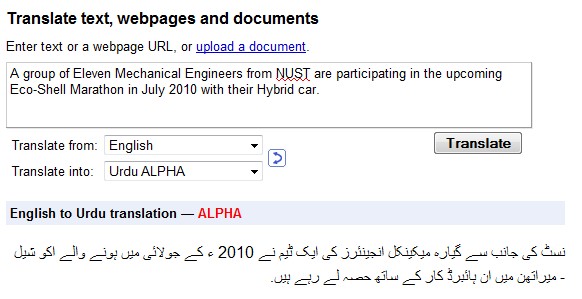
Google Translation into Urdu

Google translation helps everyday users a lot in understanding different languages dialogs.

Now Google has included Urdu translation and letting you translate 57 languages into Urdu & back.

Thursday, 15 October 2009

Arabic Proverbs (Advice)

Arabic Proverbs (Advice)
  • اترك الشر يتركك
    • Literal meaning: Leave evil, it will leave you.

  • اتق الأحمق أن تصحبه إنما الأحمق كالثوب الخلق كلما رقعت منه جانبا صفقته الريح وهنا فانخرق
    • Literal meaning: Be aware of the idiot, for he is like an old dress. Every time you patch it, the wind will tear it back again.

  • اتق شر الحليم إذا غضب
    • Literal: Beware of the level-headed when he is angry.

  • اجتنب مصاحبة الكذاب فإن اضطررت إليه فلا تُصَدِّقْهُ
    • Literal: Avoid the company of a liar. And if you can't avoid him, don't believe him.

Tuesday, 13 October 2009

How to add a simple Google Maps

During working on EGL Web 2.0 I had a need to add a Google map on a RUI page. Well, I found a very simple & an interesting way to add a Google map onto your web page without any understanding of Google Map API or don't even have to sign up for an API key.

Google helps you by providing a Wizard through which it generates a chuck of code to use in a page.

Through Wizard, there are three steps to add a Google Map onto a page.
  1. Go to the Wizard page and follow the three simple steps.
  2. Copy and paste the generated code into your own web page.

    Cut the code into two pieces. The bit that looks something like this can be placed anywhere on your page.

    <div id="mapsearch">
    <span style="margin:10px;padding:4px;">Loading...</span>
    </div>

    The rest of the code should be placed just before the at the bottom of your page.

  3. Double-click your page to test it, then upload it to your website.
The page will be look like this


There is another more simpler way than this one is to go to http://maps.google.com/ site and search/locate you desired location, when the map comes up then go to the Link anchor ( Link) on the right side of the map, click on it & copy the "Paste HTML to embed in website" to use in a web page or copy the "Paste link in email or IM" to share map via email or IM.

The map would look like the below one.

Thursday, 8 October 2009

Enterprise Generation Language

EGL (Enterprise Generation Language) is a high level, modern business oriented programming language, designed by IBM to be platform independent. EGL is similar in syntax to other common languages so it can be learned by application developers with similar previous programming background. EGL application development abstractions shield programmers from the technical interfaces of systems and middleware allowing them to focus on building business functionality. EGL applications and services are written, tested and debugged at the EGL source level, and once they are satisfactorily functionally tested they can be compiled into COBOL, Java, or JavaScript code to support deployment of business applications that can run in any of the following environments:
  • Microsoft Windows, Linux, UNIX running JVM, for example in the context of a Java EE servlet container (IBM WebSphere Application Server, Apache Tomcat, GlassFish)
  • IBM System z: CICS Transaction Server, IMS, z/OS Batch, UNIX System Services, WebSphere Application Server, z/VSE, Linux
  • IBM System i: IBM i5/OS, IBM WebSphere Application Server
  • Internet Explorer, Firefox, Safari browsers for Ajax rich web applications.
Web 2.0 & SOA are built-in in EGL, it simplifies development by hiding the complexities of Ajax, JavaScript, Rest, and SOAP from the developer.

EGL programming tools are available as an Eclipse
EGL community site is very useful site to learn, discuss, ask, answer & share info & issues.

Monday, 10 August 2009

Book Review - JSF Complete Reference

Recently I read a book on JSF named "JSF Complete Reference " written by Chris Schalk & Ed Burn.

The book presents in depth knowledge about JSF. It starts from how JSF works & why it was developed and went through to more advance level of custom component development. I would personally suggest all JSF newbies to grab this book ASAP.

Friday, 17 April 2009

Java /J2EE Free Source site

I have seen a lot of good stuff on the below site.

http://www.java-source.net/

It has categorized Open Source Java based frameworks and ready to use components like PDF libraries, Mail clients, XML GUI toolkits, blogs, network servers etc. What I like about this website is its ease of use, nice clean design and good categorization.

Tuesday, 10 March 2009

Sistechean Alumni

Now a days I ma trying to build up website dedicated to Sistechean only. Where all those friends who remained(or are)the part of Sistech will be brought together.

I have got a free web-hosting domain named 110mb.com . It offers 110 MB of data storage capacity with PHP5, Apache free of cost. But for MySQL or other advance features you have to pay for it! That's a way to catch a cow.

Well, Sistechean Alumni , Lets have a start !

Thursday, 24 January 2008

New Java 5 Features - Part 2

Printf
If you have worked on C language then you would be familiar with Printf statement. Now you can use it in java also.

See the below example

package testnewfeatures;

public class Test_PrintfStatement {

public static void main(String[] args) {
int a = 10;
String str = "Pakistan";

System.out.printf("Value of a = %d ", a );

System.out.println();

System.out.printf("How are you ? Welcome to %s ", str );

//For more details of these Formate Specifiers
//see java.util.Formatter


}
}


Variable Arguments

Public void setSomething(Object ... args) {
// . . . . .
}

Var-args
is the way to make one method able to handle more than one type of arguments. In past we were creating separate methods for each argument type.

check out below example.

package testnewfeatures;
// Testing Variable Arguments feature
public class Test_Var_Arg {

public static void main(String[] args) {
String[] names = {"Asim","Faisal","Qasim"};

oldMethod( names );
newMethod( names );
newMethod( "A","B","C","D","E","F","......Z" );

empInfo("Asim","Programmer",15000,1000);

}
// Old (Ver 1.1 - to - 1.4) method of Method Declaration
public static void oldMethod(String[] args) {
for ( String argValue : args) {
System.out.println( argValue );
}
}
// New (Ver 1.5 or Simply Java 5) method of Method Declaration
// It mush be the LAST argument
public static void newMethod(String ... args) {
for ( String argValue : args) {
System.out.println( argValue );
}
}

public static void empInfo(Object ... values) {
Object[] tempObj = {"Name","Designation",10000,500};

System.arraycopy(values,0,tempObj,0,values.length);

System.out.printf("Name = %s \nDesignation = %s \nBasic Salary = %d " +
"\nTax Deduction = %d", tempObj );
}

}


Generics
In a nutshell, generics allows java programmers to pass types as arguments to classes just as values are passed to methods.

String custName = (String) myList.getFirst(); ⁄⁄ without generics
String custName = myList.getFirst(); ⁄⁄ with generics

In the first example above we had to perform casting.
But in the second example we do not require this(casting) anymore. Because when we are going to create an object then we have to specify what type of object it will handle/support.

LinkedList<> myList = new LinkedList &ltString>();

See the examples given below.

Example 1:-

package testnewfeatures;
import java.util.Vector;
import java.util.Enumeration;
public class TestGenerics {

public static void main(String[] args) {
// Old way -- vect will accept Collection
Vector vect = new Vector();
vect.add("Hello");
vect.add(12345);
vect.add(12.123);
System.out.println("Old method of using Collection");
for (Enumeration enu = vect.elements(); enu.hasMoreElements(); ) {
System.out.println( enu.nextElement() );
}

//We are forcing vetString to accept ONLY one type

Vector &ltString> vetString = new Vector &ltString>();
//Now vetString will only accept STRING values

vetString.add("Hello");
vetString.add("Everybody");
vetString.add("How are you?");

for (Enumeration enu = vetString.elements(); enu.hasMoreElements(); ) {
System.out.println( enu.nextElement() );
}
}

}

Example 2:-
package testnewfeatures;

import java.util.Vector;
import java.util.Enumeration;

public class UsingOwnGenericeClass {

public static void main(String[] args) {
GenericOrientedClass &ltinteger> intObj = new GenericOrientedClass &ltinteger>(100);
System.out.println( intObj.getValue() );

GenericOrientedClass &ltString> strObj = new GenericOrientedClass &ltString>("Hello World");
System.out.println( strObj.getValue() );

GenericOrientedClass &ltObject> objObj = new GenericOrientedClass &ltObject>("Hi this is Object Class string");
System.out.println( objObj.getValue() );

//Generics only Works with OBJECTS NOT with Primitives
//GenericOrientedClass &ltint> objObj = new GenericOrientedClass &ltint>(10);

}

}
class GenericOrientedClass&lttempname> {
private TempName str;

public GenericOrientedClass(TempName defaultValue){
str = defaultValue;
}

public void setValue(TempName s){
str = s;
}
public TempName getValue(){
return str;
}

}


New Java 5 Features - Part 1

Java Ver 1.5 or simply Java 5 came with some new features. These new features were added to facilitate a programmer not for the enhancement in JVM performance anymore.

Below i will describe few of them with some pretty examples. Hope you will find them helpful.

Autoboxing : - Just think automatically wrapping primitives into corresponding objects (i.e Integer,Boolean etc)

Check the example given below.

package testnewfeatures;

public class TestAutoBoxing {

public static void main(String[] args) {
int a = 10;
// old method of wrapping Primitive to Corresponding type Obj
Integer intObj1 = new Integer(a);
//new method of AutoBoxing - just created for programmer's ease NOT for a better performance
Integer intObj2 = a;

boolean bol = true;

System.out.println("\t Value of intObj1 = " + intObj1 );

System.out.println("\t Value of intObj2 = " + intObj2 );

if (bol) {
System.out.println("\t This is the Old way of Conditional-Cheack = " + bol );
}

Boolean bolObj = new Boolean(true);

// If requires ONLY Boolean Primitive but here we have given a Boolean Object
// Actually Java 5 automatically 'unbox' this for you.
if (bolObj) {
System.out.println("\t This is the NEW way of Conditional-Cheack = " + bolObj );
}
}

}


Scanners

Scanner are introduced to make new java programmers happy when they like to get some inputs from the system. Before this you were supposed to create a stream object and wrap it around another stream object & then you will have a chance to get a single input!.

Check the example given below.

package testnewfeatures;

import java.util.Scanner;

public class TestScanner {

public static void main(String[] args) {
String name = null;
int age = 0;
java.util.Scanner keyboard = new java.util.Scanner(System.in);


System.out.println("Please enter your Name ");
name = keyboard.nextLine();

System.out.println("Now enter you Age");
age = keyboard.nextInt();

System.out.println("Your Name is = " + name + "\nYour Age is = " + age);

System.out.println("Now reading a File from a drive \n" );
try {

String fileText = "";

java.util.Scanner readFile = new java.util.Scanner(new java.io.File("D:\\NetBeansProjetcs\\TestNewFeatures\\src\\testnewfeatures\\InputFile.txt"));

while (readFile.hasNextLine()) {
fileText += readFile.nextLine() + "\n";
}

System.out.println (fileText);
}
catch (Exception ex) {
ex.printStackTrace();
}

}

}


Static Import

If you want to use some properties or fields more then once then use Static Import one time and use only the created shortcuts on the remaining places.

Check the example given below.

package testnewfeatures;

import static java.lang.System.out;

public class TestStaticImport {

public static void main(String[] args) {


System.out.println("This is normal way to print something" );

out.println("This is the new way to print something" );
out.println("Here we have only 'Statically imported System.out' ");
out.println("so from now on we need no more ' System.out ' association.");

}

}


Monday, 21 January 2008

Personal Training Material

I cam across a website where any one can find different articles regarding Personal Trainings to effectively improve professional life.

Here on the following link you will get it.
http://www.4shared.com/dir/4427129/defc974e/Training.html

Friday, 18 January 2008

IELTS preparation material

Last days I was preparing my self for Ielts exam & came across few web sites which are providing good IELTS,Toefl, GRE preparation materials. If anyone interested to take the exam can easily find these websites helpful.

Ielts
http://www.esnips.com/_t_/ielts?to=
http://www.britishcouncil.org/pakistan-exams-ielts-prepare.htm


Toefl & GRE
http://www.universityportal.net/2007/07/toefl-gre-practice-tests.html
http://www.esnips.com/_t_/GRE?q=GRE
http://www.esnips.com/_t_/toefl?to=

Also search on Google using words like " Ielts Audio or mp3", "Ielts or Toelf, GRe Podcasts" . different words will bring out different search results.

Tuesday, 15 January 2008

Joomla - new era of web designing

Joomla is a CMS (Content Management System) based web design toolkit/package/software. Nowadays CMS based web design getting attention worldwide. A web designer who is amateur or professional in his/her profession grab themas quickly as they understand it.

I was always involved in web design using old conventional system scripting, coding, creating templates, choosing color schemes and son on.... But the real power of CMS i discovered when i first created my local web site using it.

Amazingly i was surprised to see it's power of creating a full featured and standard based web sites easily & efficiently. This also supports Web 2.0 design features.

The way CMS - specially Joomla works is that it comes with different modules. Each module provides different functionalities.